
Authentication
To call the Flow API you need a Generio account and an API key from the account portal. The key is sent with every request so Generio can authorize your integration.
Get your API key
Follow these steps once. After that, use the same key (until it expires) for all Flow API requests.
1. Create a Generio account
Go to account.generio.ai. Sign in or sign up with your Email, or use an OAuth provider: Google, Facebook, Discord, or GitHub.
2. Open the API Keys tab
In the Sidebar, click your Profile and select Account. On the Account settings page, open the API Keys tab.
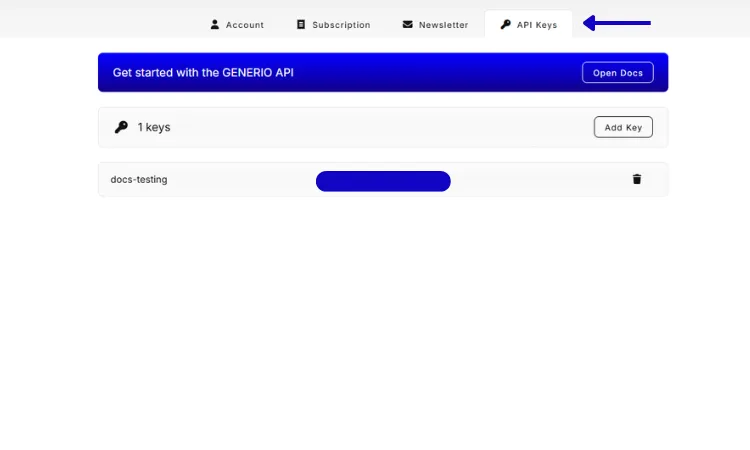
3. Create and save your key
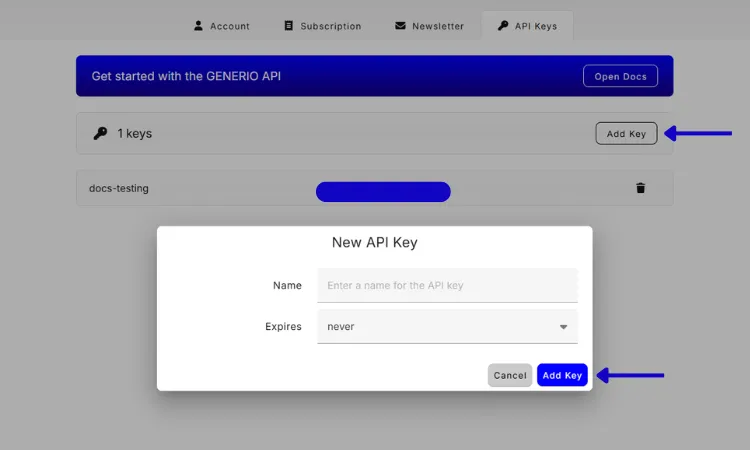
Click Add key, enter a name and expiry, then confirm with Add key. A dialog shows the new key ONLY ONCE. Copy it immediately and store it in a secure place. You will not be able to see the full key again after you close the dialog.
API Key Format
Generio API keys are a single string: the prefix api_generio. followed by a random segment. Use the entire value as the Bearer token, do not trim or alter it.
Example
api_generio.<example-random-string>
Authentication Method
All API requests require a Bearer token in the Authorization header. Use your API key as the token.
Example
import requests

# Get your API key at: https://account.generio.ai -> API Keys tab
API_KEY = "your-api-key-here"
BASE_URL = "https://flows.generio.ai"

# Include this header with every request
headers = {"Authorization": f"Bearer {API_KEY}"}

# Example request
response = requests.post(f"{BASE_URL}/flows", headers=headers, json=payload)
What's Next?
- You can find all available endpoints in All Endpoints.
- Learn more about the core concepts in Flow.
- Review state transitions in Flow Lifecycle.
- Diagnose issues in Troubleshooting.
- We appreciate your feedback! If you encounter any errors, bugs, or inconsistencies please reach out to us. Join our Discord server or contact us.